


Most Popular Products

|
Epson Scanners
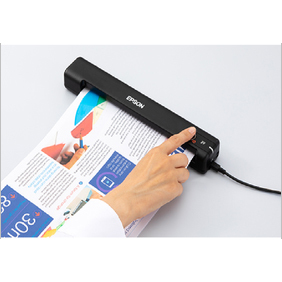

Epson Scanners Specification
- Connectivity Type
- USB, LAN
- Paper Size
- A4, A5, Letter
- Scan Speed
- 25 ppm / 50 ipm (ADF)
- Function Type
- Scan Only
- Dimension (L*W*H)
- Exc. 300 x 170 x 155 mm
- Accessory Name
- ADF tray, USB cable
- Noise Level
- Less than 50 dB
- Usage & Applications
- Office, Educational Institutions, Business Solutions, Document Archiving
- Production Output
- Digital Images, PDF, JPEG, TIFF
- Power Consumption
- 18W (Operation), <1W (Standby)
- Install Type
- Desktop
- Scanning Resolution
- Up to 1200 x 2400 dpi
- Display Type
- LCD Indicator
- Features
- Duplex Scanning, OCR Support, Compact Design
- Memory Size
- 512 MB
- Type
- Flatbed & Sheet-fed
- Interface Type
- USB 2.0, Ethernet LAN
- Color Depth
- Up to 48-bit input, 24-bit output
- Scan Type
- Color, Monochrome
- Max Paper Size
- 216 x 297 mm (A4)
- Size
- A4, Letter
- Weight
- Approx. 4.0 kg
- ADF Capacity
- 50 Sheets
- Cable Length
- 1.8 meters
- Mobile Connectivity
- Epson DocumentScan App support
- Environmental Compliance
- RoHS, Energy Star
- Bundled Software
- Epson Scan, Document Capture Pro
- Supported File Formats
- PDF, JPEG, TIFF, BMP
- Driver Support
- TWAIN, ISIS
- Warranty Extension
- Optional upto 3 Years
- Light Source
- LED
- Calibration
- Automatic
- Operating System Compatibility
- Windows 7/8/10, Mac OS X
- Duty Cycle
- Up to 3,000 pages/day
About Epson Scanners
Epson is a well-known manufacturer of high-quality scanners for home and business use. Epson scanners are known for their reliability, ease of use, and advanced features that allow for fast and accurate scanning.Epson offers a range of scanners to suit different needs, including flatbed scanners, sheet-fed scanners, and portable scanners. Flatbed scanners are ideal for scanning photos, books, and other documents that require a flat surface. Sheet-fed scanners are designed for high-volume scanning of multiple pages, and portable scanners are compact and lightweight for easy transport.Epson scanners come equipped with features such as automatic document feeders, duplex scanning, optical character recognition (OCR), and high resolution scanning up to 6400 dpi. Some models also offer wireless connectivity and compatibility with popular software such as Adobe Photoshop.
Advanced Document Management
With a 50-sheet ADF and duplex scanning capability, Epson scanners streamline document handling for busy offices and educational institutions. The impressive scan speeds of up to 25 ppm / 50 ipm, combined with a robust daily duty cycle of 3,000 pages, ensure high productivity for demanding workflows. Enhanced with OCR and bundled software, these scanners make archiving, sharing, and organizing documents fast and efficient.
Versatile Connectivity and Compatibility
Epson scanners support both USB 2.0 and Ethernet LAN interfaces for flexible installation, while mobile connectivity via the Epson DocumentScan App allows convenient scanning from smart devices. Compatible with Windows 7/8/10 and Mac OS X, these devices integrate seamlessly into mixed IT environments. TWAIN and ISIS driver support broadens usage across various document management systems.
Eco-Friendly and Reliable Design
Meeting RoHS and Energy Star standards, Epson scanners are designed with environmental responsibility in mind. The efficient LED light source and low power consumption reduce operational costs. A compact, sturdy build ensures longevity and low noise levels (less than 50 dB), and with optional warranty extension up to three years, users benefit from lasting peace of mind.
FAQ's of Epson Scanners:
Q: How do I set up the Epson scanner with both USB and Ethernet LAN connectivity?
A: To set up your Epson scanner, connect the USB cable (1.8 meters included) or an Ethernet LAN cable to the appropriate port. For USB, plug it directly into your computer; for LAN, connect it to your network switch or router. Install the bundled Epson Scan and Document Capture Pro software, then follow the prompts to complete installation. Ensure your device's drivers are updated for optimal performance.Q: What file formats can I save scanned documents in with this scanner?
A: Epson scanners support multiple output formats, including PDF, JPEG, TIFF, and BMP. You can choose your preferred format during the scanning process when using Epson Scan, Document Capture Pro, or the Epson DocumentScan App, ensuring your documents are compatible with various business and archival needs.Q: When should I use the Automatic Document Feeder (ADF) versus the flatbed option?
A: Use the ADF when scanning multi-page documents or batches up to 50 sheets for high efficiency. The flatbed is ideal for small, delicate, or irregular documents, such as ID cards or bound materials. Switching between ADF and flatbed modes ensures flexibility for diverse document types and sizes.Q: Where can I download the latest drivers and Epson software for my scanner?
A: You can download the latest drivers and software directly from Epson's official support website by searching for your scanner model. This ensures compatibility with operating systems including Windows 7/8/10 and Mac OS X, and provides updates for TWAIN and ISIS driver support.Q: What is the benefit of automatic calibration in this scanner?
A: Automatic calibration ensures each scan is of optimal quality without manual adjustments. This feature compensates for minor changes in document thickness, alignment, and ambient light, delivering consistently accurate color depth of up to 48-bit input and 24-bit output.Q: How does the optional warranty extension work, and what are its advantages?
A: The Epson scanner comes with a standard warranty, with an option to extend it up to three years. This extended coverage protects against potential hardware issues and offers additional support, providing peace of mind for businesses relying on consistent document processing.Q: What typical applications can benefit from this scanning solution?
A: This scanner is ideal for offices, educational institutions, business solutions, and document archiving. Applications include digitizing records, processing student documents, invoice management, legal documentation, and any scenario needing fast, reliable, and high-quality digital document workflows. Get Latest Price
Tell us about your requirement

Price:
Quantity
Select Unit
- 50
- 100
- 200
- 250
- 500
- 1000+
Additional detail
Mobile number
Email


Quick Inquiry


Contact Details
GLOBAL TEK (INDIA)
GST : 27BEHPS2159N1ZU
GST : 27BEHPS2159N1ZU
B No. 512, SCWP Sangeeta CHS LTD, Western Express Highway, Dahisar East,Mumbai - 400068, Maharashtra, India
Phone :07971670514
 Send Inquiry
 |
GLOBAL TEK (INDIA)
All Rights Reserved.(Terms of Use) Developed and Managed by Infocom Network Private Limited. |
